Running an online business involves more than attracting visitors to a website or posting products on social media. You also need to answer customer questions, follow up with potential buyers, process orders, and maintain relationships with existing customers. When these tasks become difficult to manage, valuable sales opportunities can be missed.
The WhatsApp Business API offers a practical way to improve business communication and manage customer interactions at a larger scale. It allows businesses to connect messaging with automated workflows, customer support systems, and marketing activities.
For businesses looking to simplify these tasks, WhatsFlow provides tools for WhatsApp messaging, chatbots, campaign management, and team collaboration. Its platform brings several communication features together, helping businesses manage customer conversations from one place.
This guide explains how to use WhatsApp API to grow an online business step by step, from setting up your communication system to improving customer engagement and measuring results.
What Is WhatsApp API, and Why Does It Matter for Online Businesses?
The WhatsApp Business API, commonly associated with the WhatsApp Business Platform, enables businesses to integrate WhatsApp messaging into their customer service, sales, and automation systems.
Unlike basic messaging tools designed mainly for individual conversations, the API supports business workflows that can handle larger volumes of messages and customer interactions.
Businesses can use it to:
- Respond to customer enquiries more efficiently.
- Send order confirmations and appointment reminders.
- Automate common questions with chatbots.
- Share product information and promotional messages with customers who have agreed to receive them.
- Manage conversations across a sales or support team.
- Connect WhatsApp with other business applications.
The API supports automated communication, interactive messages, approved templates, and integrations that help businesses manage customer relationships throughout the buying process.
For example, an online clothing store could use WhatsApp to answer questions about sizes, send order updates, and follow up with customers who request information about a product.
The goal is to make communication easier for customers while helping the business manage its daily workload.
Step 1: Set Up WhatsApp Business API With WhatsFlow

The first step is to establish a reliable messaging system for your business. Before running campaigns or building chatbots, make sure customers have a convenient way to contact you.
With WhatsFlow, businesses can begin exploring WhatsApp Business API tools through a central dashboard. The platform offers onboarding support and features for managing conversations and campaigns.
Follow these steps:
- Visit WhatsFlow: Open whatsflow.app and review the available features and plans.
- Create your account: Choose an appropriate starting option and follow the platform’s onboarding instructions.
- Connect your business messaging setup: Complete the required WhatsApp Business Platform steps, including any business verification or phone-number setup that applies to your account.
- Prepare your business profile: Use a recognisable business name and provide accurate details about your products, services, and support hours.
- Test the system: Send test messages and check that incoming customer enquiries reach the correct inbox.
Before starting, review the current WhatsApp and WhatsFlow requirements. API access, messaging charges, verification requirements, and available features can vary according to your setup and chosen plan.
Starting with a small, tested setup makes it easier to identify problems before you begin handling more customer conversations.
Step 2: Build a Customer Contact List

A well-organised contact list helps you communicate with the right customers at the right time. Instead of sending the same message to everyone, group your contacts according to their interests and relationship with your business.
For example, an online store could organise its contacts into groups such as:
- New customers who have recently placed their first order.
- Returning customers who purchase regularly.
- Potential customers who have asked about products.
- Customers interested in a particular product category.
- Existing customers who want delivery updates or after-sales support.
WhatsFlow offers contact management, custom fields, and tags to help businesses organise customer information. Its available features depend on the subscription plan.
How to organise your contacts
- Collect contact details through your website, checkout process, or customer enquiries.
- Ask customers for clear permission to receive relevant WhatsApp messages.
- Import and organise contacts using the tools available in your WhatsFlow account.
- Add appropriate tags, such as
new-customer,returning-customer, orproduct-interest. - Keep contact information accurate and honour requests to stop receiving promotional messages.
A properly maintained contact list makes your marketing more relevant and helps reduce unwanted messages.
Step 3: Automate Customer Support With WhatsApp Chatbots

Customer support can become a major challenge as an online business grows. Customers may ask the same questions about prices, delivery times, product availability, payment methods, and return policies throughout the day.
Answering every enquiry manually takes time away from other business activities.
WhatsFlow provides a chatbot builder that helps businesses automate common conversations without requiring them to write code for every workflow. Businesses can create flows for frequently asked questions, lead collection, order enquiries, and other supported tasks.
How to create a simple chatbot
- Identify the five to ten questions customers ask most frequently.
- Write short, accurate answers to each question.
- Create a welcome message that explains the available options.
- Build a menu that allows customers to choose a topic.
- Add a route to a human support agent when the chatbot cannot resolve an issue.
- Test the flow using several realistic customer questions before making it available to everyone.
Here is an example of a simple automated conversation.
Hello! I want to know about your products.Customer
Welcome! How can we help you today?
1. View products
2. Check an order
3. Speak to our teamAutomated reply
1. View productsCustomer
Please tell us which product category you are interested in, and we will share the relevant information.Automated reply
This type of flow helps customers find information without waiting for a staff member to answer every basic question.
Important: A chatbot should make customer service easier, not create another obstacle. Keep menus simple and offer human assistance when a customer needs personal attention.
Step 4: Run Targeted WhatsApp Marketing Campaigns
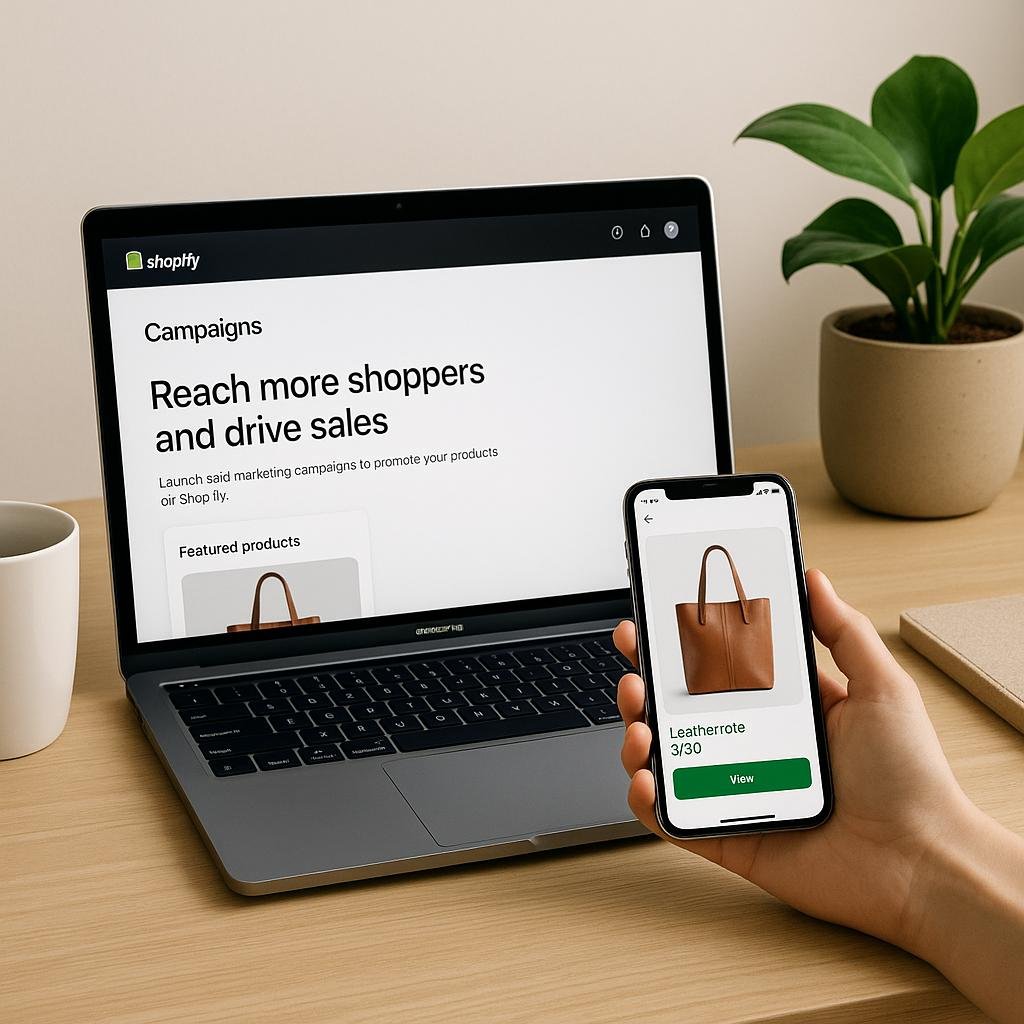
Once you have organised your contact list, you can use WhatsApp to share product launches, special offers, business announcements, and other relevant updates.
WhatsFlow includes broadcast campaigns, contact targeting, scheduling, and campaign reporting features, subject to the chosen plan. These tools can help businesses manage promotional communication without preparing each message individually.
How to launch a campaign
- Decide on one clear goal, such as promoting a new product or announcing a seasonal offer.
- Select a relevant audience from your organised contact list.
- Prepare a concise message that explains the offer or update.
- Include a useful product link, image, or clear call to action.
- Set a suitable sending time and review the campaign before launch.
- Monitor delivery, reads, replies, and resulting enquiries or sales where tracking is available.
For messages initiated by a business outside the customer-service messaging window, WhatsApp generally requires an approved message template. Businesses must also follow the applicable consent, messaging, and quality rules.
Example of a promotional message
New arrivals are here!
We have added new products to our online store. If you are interested, take a look at the latest collection below.
Browse the collection: [Your product page]
Example message only. Replace the link with your actual product page and send only to customers who have consented to receive relevant updates.
Avoid sending too many promotions. A useful campaign gives customers a reason to engage, while repeated and irrelevant messages can lead to blocks, complaints, and reduced trust.
Step 5: Manage All Customer Conversations in One Inbox

As your business grows, several team members may need to respond to WhatsApp enquiries. When conversations are scattered across different phones, it becomes harder to track who is handling each customer.
WhatsFlow’s team inbox helps bring customer conversations into one workspace. Depending on your plan, team members can collaborate, manage chats, and handle enquiries through a shared inbox.
How a shared inbox improves business operations
- Assign conversations: Direct sales enquiries to the sales team and technical questions to support staff.
- Reduce missed messages: Give your team a central place to review incoming conversations.
- Improve response times: Make it easier for staff to identify unanswered enquiries.
- Maintain continuity: Help team members understand previous conversations when handling a follow-up.
- Coordinate customer service: Establish clear responsibility for each conversation.
For example, a customer asking about delivery can be directed to the appropriate staff member, while a person asking about wholesale prices can be handled by the sales team.
A shared inbox becomes especially useful when the business starts receiving more enquiries than one person can comfortably manage.
Step 6: Follow Up With Potential Customers
Many customers do not purchase the first time they enquire about a product. They may need additional information, time to compare options, or help choosing the right item.
A structured follow-up process helps your business continue the conversation without requiring staff to remember every enquiry manually.
WhatsFlow’s automation and campaign features can support follow-up workflows, depending on the account setup and plan.
A simple follow-up process
1. Receive the enquiry
A potential customer asks about a product or service through WhatsApp.
2. Record the details
Save relevant information, such as the product of interest and the customer’s questions.
3. Schedule an appropriate follow-up
Send a helpful response at an agreed or suitable time, following WhatsApp’s rules.
4. Help the customer decide
Answer remaining questions and provide the correct checkout or booking link.
A good follow-up should be useful and relevant. If a customer is not interested, respect that decision rather than repeatedly sending sales messages.
Step 7: Connect WhatsApp With Your Existing Business Tools

Manually copying information between different applications can slow down daily operations and introduce errors. Connecting WhatsApp with the tools your business already uses can help simplify these tasks.
WhatsFlow lists integrations for services such as Shopify, Google Sheets, and Google Calendar on supported plans. It also offers API integration options for businesses that need to connect their messaging workflows with other systems.
Here are some practical ways to use integrations.
| Business need | Example application |
|---|---|
| Online sales | Connect your store to supported messaging workflows. |
| Contact management | Organise customer information in a connected spreadsheet. |
| Appointment scheduling | Coordinate bookings using supported calendar integrations. |
| Customer enquiries | Route messages to the relevant team or workflow. |
| Order updates | Connect supported systems to send appropriate notifications. |
The exact level of automation depends on the integration, your configuration, and the data available from each application. Check the available integration documentation before promising customers that a particular process will run automatically.
Step 8: Track Campaign Performance and Improve Results
Sending messages is only one part of WhatsApp marketing. You also need to understand which activities help customers take meaningful action.
WhatsFlow provides campaign reporting and analytics features that can help businesses review messaging performance.
Focus on the following measurements:
- Delivery rate: The percentage of attempted messages that are successfully delivered.
- Read rate: The proportion of delivered messages that are marked as read, where the data is available.
- Reply rate: The proportion of contacted customers who respond.
- Conversion rate: The percentage of relevant contacts who complete a desired action, such as placing an order or booking a service.
- Cost per conversion: The amount spent on a campaign divided by the number of conversions attributed to it.
You do not need to optimise every metric at once. Start by identifying the main goal of each campaign and use the available data to understand whether it is working.
Example: Measure a WhatsApp campaign
Imagine an online shop sends a campaign to 500 opted-in contacts. Of those contacts, 100 respond and 20 complete a purchase.
The campaign’s reply rate is 20% of the contacted audience, and its purchase conversion rate is 4% of the contacted audience, assuming all 500 were successfully contacted and purchases are attributed to that campaign.
These figures are illustrative, not a forecast of what your business will achieve.
Use your actual results to test different offers, message formats, audiences, and sending times. Change one major factor at a time so you can better understand what makes a difference.
Step 9: Choose the Right WhatsFlow Plan as Your Business Grows
A new business may need only a basic messaging setup, while a larger company may require several team members, more chatbot workflows, and additional integrations.
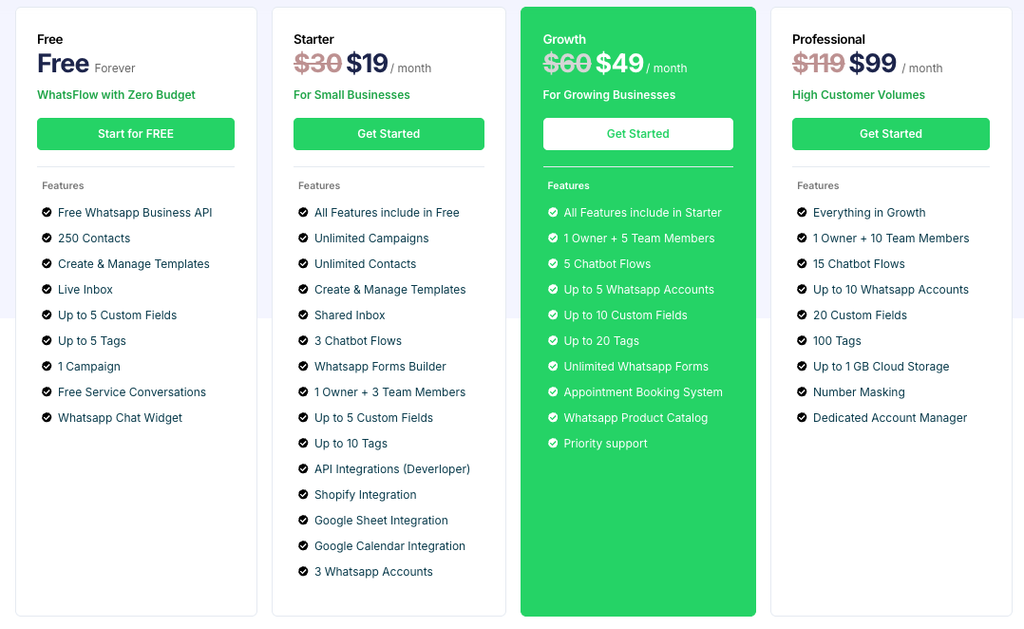
WhatsFlow offers different plans intended for different business needs, including a free starting option and paid subscriptions. Its published feature list includes the following options, although prices and plan details should be checked on the official pricing page before purchase.
Free
Getting started
For businesses exploring WhatsApp automation.
- Published allowance of 250 contacts.
- Live inbox and contact-management features.
- One campaign and message-template management.
- WhatsApp chat widget.
Starter
For small businesses with regular customer enquiries.
- Unlimited campaigns and contacts, according to the published plan.
- Shared inbox and three chatbot flows.
- Shopify, Google Sheets, and Google Calendar integrations.
- Team access for an owner and up to three team members.
Growth
For businesses expanding their sales and support operations.
- Five chatbot flows.
- Appointment booking and WhatsApp product catalogue features.
- More connected WhatsApp accounts and team access.
- Priority support.
Professional
For businesses with higher customer communication needs.
- Fifteen chatbot flows.
- Expanded team access and connected account allowances.
- Additional contact fields and tags.
- Cloud storage and number masking features as listed in the plan.
Plan descriptions summarise features published by WhatsFlow. Confirm current availability, prices, limits, and messaging fees at WhatsFlow Pricing.
When comparing plans, consider your contact volume, the number of staff members who need access, the complexity of your chatbot flows, and the integrations your business requires.
Remember that a platform subscription and WhatsApp message charges may be separate costs. Review the applicable Meta messaging fees and your selected provider’s pricing before launching campaigns at scale.
Step 10: Apply Best Practices for Sustainable Growth
Technology can improve your business processes, but the way you communicate with customers matters just as much as the tools you use.
Follow these practices when implementing WhatsApp API.
Get customer consent. Explain what kinds of messages customers can expect and obtain the required permission before sending promotional communications.
Use approved templates where required. Business-initiated messages outside the customer-service window generally require approved templates under WhatsApp’s rules.
Keep messages relevant. Share information that matches the customer’s interests, recent enquiry, or relationship with your business.
Avoid excessive messaging. Set a reasonable campaign schedule and pay attention to customer feedback, blocks, and complaints.
Offer human support. Make it easy for customers to speak with a person when automated replies are insufficient.
Protect customer information. Limit access to business conversations and contact data to authorised staff, and follow applicable privacy requirements.
Test before scaling. Start with a small audience, review the results, and improve the process before increasing campaign volume.
These practices align with WhatsApp’s guidance on relevant messaging, customer opt-in, quality, and policy compliance.
Which Businesses Can Benefit From WhatsApp API?
WhatsApp API can support a wide range of online and service-based businesses. The most useful workflows depend on how customers discover, evaluate, and purchase your products or services.

E-commerce stores
Automate order-related communication, answer product questions, announce new arrivals, and help customers find relevant products.

Salons and service providers
Manage enquiries, share service information, coordinate bookings, and send appointment reminders.

Education and training businesses
Respond to course enquiries, share programme details, and provide application or registration updates.

Real estate agencies
Respond to property enquiries, share listing information, arrange viewings, and follow up with interested prospects.

Marketing agencies and consultants
Organise client conversations, manage incoming leads, and coordinate follow-ups from one shared workspace.
WhatsFlow lists several of these industries among the business sectors it serves.
How WhatsFlow Helps Your Online Business Grow
Growing an online business requires consistent communication, an organised sales process, and a good customer experience. Managing these activities manually becomes harder as the number of enquiries increases.
WhatsFlow brings several important tools together in one platform:
- WhatsApp API access to support business messaging.
- Chatbot automation to handle common questions and guide customers.
- Broadcast campaigns to share relevant updates with opted-in audiences.
- Team inbox to help staff manage customer conversations.
- Contact management to organise customers using fields and tags.
- Integrations to connect supported business applications and workflows.
- Campaign analytics to help measure messaging performance.
These features can help reduce repetitive work, improve customer response processes, and create more opportunities to turn enquiries into sales. Actual results depend on your products, audience, implementation, and marketing approach.
Start Growing Your Business With WhatsFlow
WhatsApp API gives online businesses a way to manage customer communication beyond individual chats. By combining automation, customer support, targeted campaigns, and performance tracking, you can build a more organised process for attracting customers and maintaining relationships.
The best approach is to start with one clear objective. You might automate frequently asked questions, improve follow-up with potential customers, or organise all incoming enquiries in a shared inbox. Once that process works well, introduce additional workflows based on your business needs.
If you want to explore these options, visit WhatsFlow.app to review its WhatsApp Business solutions, explore the available plans, and find the features that suit your business.
With a clear strategy and responsible use of automation, WhatsApp can become a useful part of your long-term online business growth plan.
Frequently Asked Questions
1. What is WhatsApp API used for in business?
WhatsApp API allows businesses to connect WhatsApp messaging with customer support, notifications, approved marketing messages, chatbots, and other business workflows.
2. Can I automate customer replies using WhatsFlow?
Yes. WhatsFlow offers a chatbot builder for creating automated conversation flows, including responses to common questions and supported lead-management workflows. Available features depend on your plan.
3. Can WhatsApp API help increase online sales?
It can support sales by helping businesses respond to enquiries, share product information, follow up with interested customers, and deliver relevant offers. However, sales growth is not guaranteed and depends on the quality of your products, communication, and overall sales process.
4. Can I send bulk WhatsApp messages?
WhatsApp Business Platform supports business messaging at scale, including template-based campaigns where permitted. You must follow WhatsApp’s messaging policies, obtain the required consent, and use approved templates when required.
5. Do I need coding skills to use WhatsFlow?
WhatsFlow advertises no-code chatbot-building tools and a dashboard designed to simplify business automation. More advanced integrations may require technical configuration.
6. How much does WhatsFlow cost?
WhatsFlow publishes a free plan and several paid plans. Visit the official pricing page for current subscription prices, feature limits, and applicable messaging charges.
7. How do I get started with WhatsFlow?
Visit whatsflow.app, review the available plans, create an account, and follow the onboarding instructions for your WhatsApp Business setup.